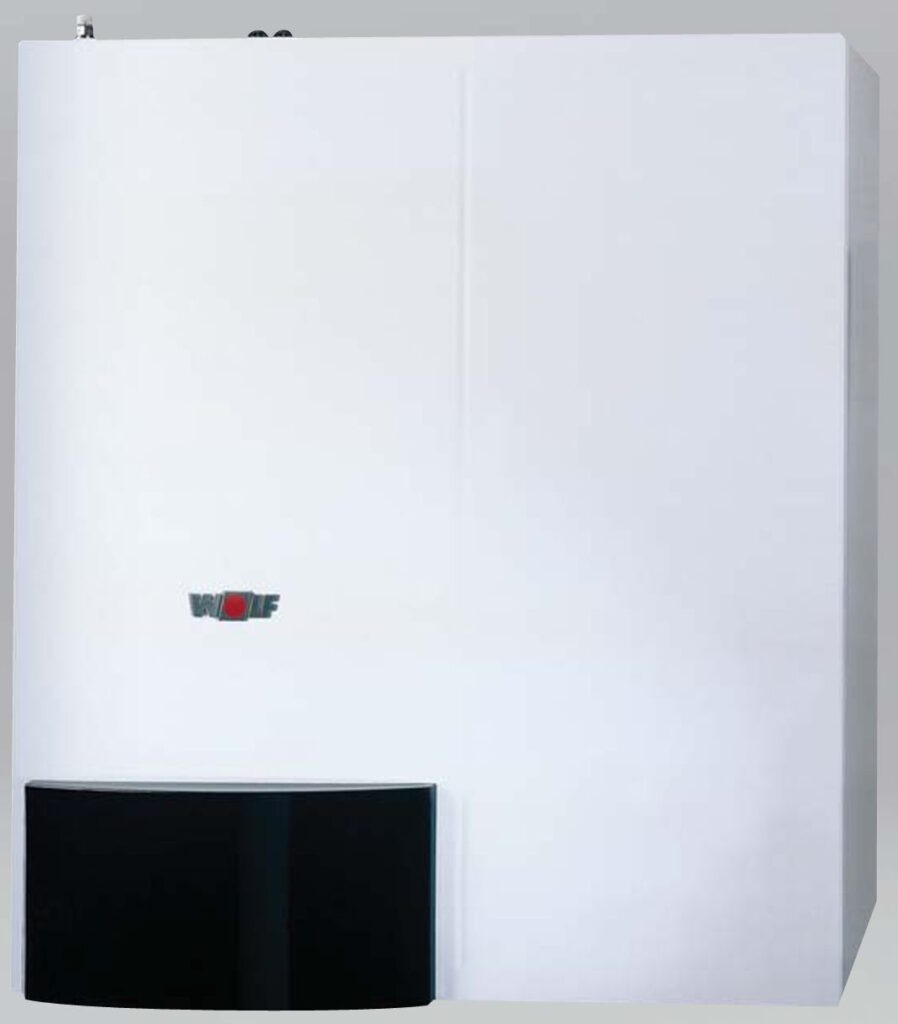
I have a Wolf CGW-11-100 and there are zero public eBUS definitions for it. Here’s how I built them from scratch. Without any cloud service, without modifying the boiler, and without sending a single control command. The result: live boiler data flowing into Loxone and Grafana for under €30, entirely open-source.
I thought this is not gonna be possible
My Loxone Miniserver controls a lot of things in the house: Lights, blinds, roof windows, garden irrigation, presence detection, air-conditioning, weather data, energy monitoring and many more. The one thing that was completely invisible to it was the heating system. I had a Wolf CGW-11-100 gas condensing boiler with a Wolf BM room thermostat, and Loxone had no idea whether the boiler was running, in what mode, at what temperature, or why. The only thing I had connected was the circulation pump for hot water, as I wanted to tie the logic based on presence, and some schedule. Apart from that, the boiler was in complete isolation and the only interface was a human when navigating in the BM module. It has no Wi-Fi, no other connectivity than one input called E1. Pretty basic stuff, even though inside if the control thermostat (BM module|) you could see plenty of interesting data. But how to get to these?
The initial plan was straightforward: purchase the official ebusd dongle from the ebusd project by john30, run it as a standalone service, and poll values from its built-in HTTP interface. The dongle is a single purpose-built eBUS adapter with its own firmware that connects directly to the bus and exposes data over Wi-Fi. Neat hardware, active project, exactly what I needed.
The problem: john30’s community configuration repository does not cover the Wolf CGW-11-100. It is an older model with an older bus implementation, and the available message definitions simply did not match the frames appearing on my bus. The dongle was in, the bus was live, but nothing was being decoded correctly. Heater was speaking different language than what the dongle was trained for.
At that point I could have stopped and bought the Wolf ISM8i proprietary gateway instead. I did not. Instead, I have reconfigured the dongle to just pass all the bus data to my Raspberry Pi running ebusd, started capturing raw frames, and began analyzing the bus traffic manually. What started as a workaround turned into a genuinely enjoyable reverse-engineering project, and the end result is richer than what any off-the-shelf gateway would have provided.
As far as I can determine, the frame definitions documented in this article do not exist anywhere else publicly. The ebusd configuration repository has partial coverage for newer Wolf models (CGW-2, …), but the CGW-11-100 is absent. No home automation forum, no GitHub issue, no community wiki has published the PBSB codes, field layouts, or mode byte values for this model. Wolf does not publish eBUS protocol documentation publicly. If you have a CGW-11-100 or similar and have been stuck for the same reason, this is the missing piece.
Key Finding
The Wolf CGW-11-100 broadcasts a rich set of values on the eBUS every few seconds, entirely passively. The boiler, the BM thermostat, and the zone controller all transmit their full state on a fixed schedule regardless of whether anyone is listening. Passive monitoring requires no authentication, no pairing, and carries no risk of interfering with the heating system.
Eight useful values are readable:
| Value | Source message | Notes |
|---|---|---|
| Operating mode | BM thermostat (BMMode) | The only field that distinguishes TAP from MOON mode |
| Burner state | Boiler broadcast (BoilerBcast) | Off / pre-purge / ignition / running / post-purge / cooldown |
| Flow temperature (°C) | Boiler broadcast (BoilerBcast) | “Temp heater real” on BM display – confirmed |
| Return temperature (°C) | Boiler broadcast (BoilerBcast) | Raw unsigned byte |
| DHW tank temperature (°C) | Boiler broadcast (BoilerBcast) | “Temp TUV” on BM display – confirmed |
| Burner modulation (%) | Boiler broadcast (BoilerBcast) | Confirmed against service menu HG parameters |
| Outdoor temperature (°C) | Boiler→BM report (BoilerReport) | Confirmed against BM display reading |
| Weather-compensated HC setpoint (°C) | BM thermostat (BMMode) | Drops to 5°C when heating is inactive |
Hardware Setup
The eBUS is a two-wire bus carrying both power and data on the same pair. The boiler and thermostat are already connected to it. To listen in, an eBUS interface that can be reached over the network is needed. See here for more details: https://github.com/john30/ebusd/wiki
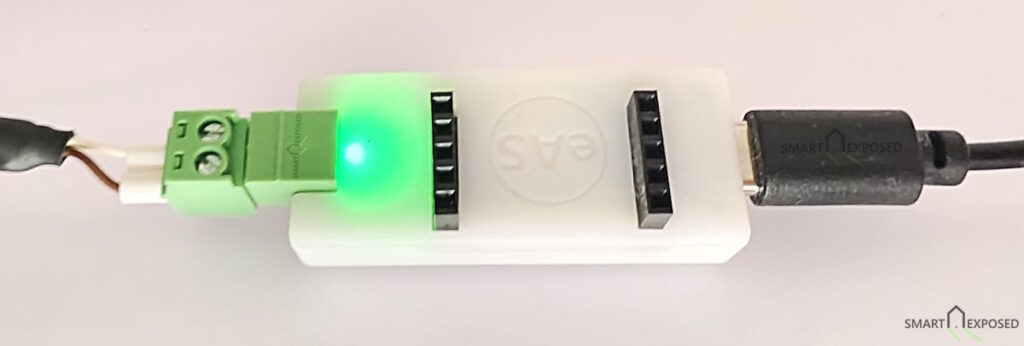
In my case the ebusd dongle (a Waveshare-based RS485 serial server in enhanced TCP mode) connects to the eBUS wires and presents the bus as a TCP socket at 10.13.13.59:9999. The Raspberry Pi 5 running ebusd connects to this socket over the local network. No physical serial connection to the RPi is required.
Bus participants observed:
| Address | Role |
|---|---|
0x03 | Wolf CGW-11-100 boiler |
0x10 | Zone controller (internal) |
0xF1 | BM thermostat |
0x30 | Kromschröder heat meter / clock module |
0x31 | ebusd (passive listener, address auto-assigned) |
The Kromschröder module (0x30) broadcasts a live clock timestamp on the bus every minute. The daemon forwards this timestamp to Loxone, where a frozen value immediately signals a lost eBUS connection.
ebusd claims address 0x31 as its own but only listens – it does not transmit any commands to the boiler.
ebusd: The Decoder
ebusd is an open-source daemon for Linux that connects to an eBUS interface, decodes frames according to CSV configuration files, and exposes the results via a TCP command interface on port 8888. It handles bus arbitration, frame validation, and CRC checking transparently.
The configpath gotcha
This was the first significant obstacle after getting the bus live. ebusd’s configuration repository includes auto-downloaded definitions for the Kromschröder SW=0204 module that shares my bus. When these are loaded alongside the Wolf message definitions from the src/ configpath, the Wolf broadcasts are silently dropped due to PBSB conflicts. No error, no warning, the Wolf messages simply stop appearing.
The fix is to use the archived/en configpath, which skips the auto-download entirely:
--device=enh:10.13.13.59:9999
--configpath=/etc/ebusd/ebusd-configuration/archived/en
--scanconfig
--loglevel=notice
Message definitions
All Wolf message definitions live in a single hand-crafted CSV file, developed entirely through passive bus capture and cross-referencing with the boiler’s service menu. No Wolf technical documentation was available or used. ebusd decodes each frame by matching the source address, destination address, and PBSB (two-byte primary/secondary command identifier). Five messages were identified through passive capture:
# BoilerBcast: boiler (0x03) broadcast every ~3 seconds, PBSB=0503
u,boiler,BoilerBcast,Boiler broadcast 0503,03,fe,0503,,status,m,UCH,,,boiler status,
  modstate,m,UCH,,,mode state,hxtemp,m,D1C,,°C,heat exchanger temp,
  dhwsectemp,m,UCH,,°C,burner modulation %,flowtemp,m,D1C,,°C,actual flow temp,
  returntemp,m,UCH,,°C,return temp raw,dhwtemp,m,UCH,,°C,DHW storage tank temp,
  flags,m,UCH,,,status flags

# BoilerReport: boiler (0x03) to BM thermostat (0xF1), PBSB=0800
u,boiler,BoilerReport,Boiler RcTarget 0800,03,f1,0800,,desiredtemp,m,D2B,,°C,flow target,
  outsidetemp,m,D2B,,°C,outside temp,forced,m,D1B,,%,forced performance,
  flags,m,UCH,,,mode flags,hwcdesiredtemp,m,D2B,,°C,DHW setpoint

# BMMode: BM thermostat (0xF1) broadcast every ~10 seconds, PBSB=0800
u,bm,BMMode,BM mode broadcast 0800,f1,fe,0800,,hcsetpoint,m,D2B,,°C,HC setpoint,
  b2,m,UCH,,,unknown,b3,m,UCH,,,const 0x06,b4,m,UCH,,,const 0x00,
  mode,m,UCH,,,mode byte,b6,m,UCH,,,const 0x00,dhwsetpoint,m,UCH,,°C,DHW setpoint

# HcOperation: zone controller (0x10) to boiler (0x03), PBSB=0507
u,controller,HcOperation,Zone ctrl to boiler 0507,10,03,0507,,status,m,UCH,,,op status,
  action,m,UCH,,,pump action,desiredtemp,m,D2C,,°C,desired flow temp,
  desiredpress,m,D2B,,bar,desired pressure,settingdegree,m,D1C,,%,modulation,
  hwcdesiredtemp,m,D1C,,°C,DHW desired temp,fuel,m,UCH,,,fuel type

# BMBcast: BM thermostat (0xF1) broadcast, PBSB=0503
u,bm,BMBcast,BM broadcast 0503,f1,fe,0503,,status,m,UCH,,,BM status,
  roomstate,m,UCH,,,0=no room data 1=room active,roomtemp,m,D1C,,°C,room temp,
  b3,m,UCH,,,n/a,flowtemp,m,D1C,,°C,flow temp relayed,b5,m,UCH,,,n/a,
  dhwtemp,m,UCH,,°C,DHW temp relayed,flags,m,UCH,,,status flags
Critical CSV note: ebusd’s parser uses commas as field delimiters. Any comma inside a description string silently breaks parsing for all remaining fields on that line. This caused a baffling “element not found” error during development where every change to the BoilerBcast definition mysteriously broke the whole message. The root cause was a comma in the description text
(raw byte, UCH confirmed). The lesson: never use commas in ebusd CSV description fields.
Decoding the Messages
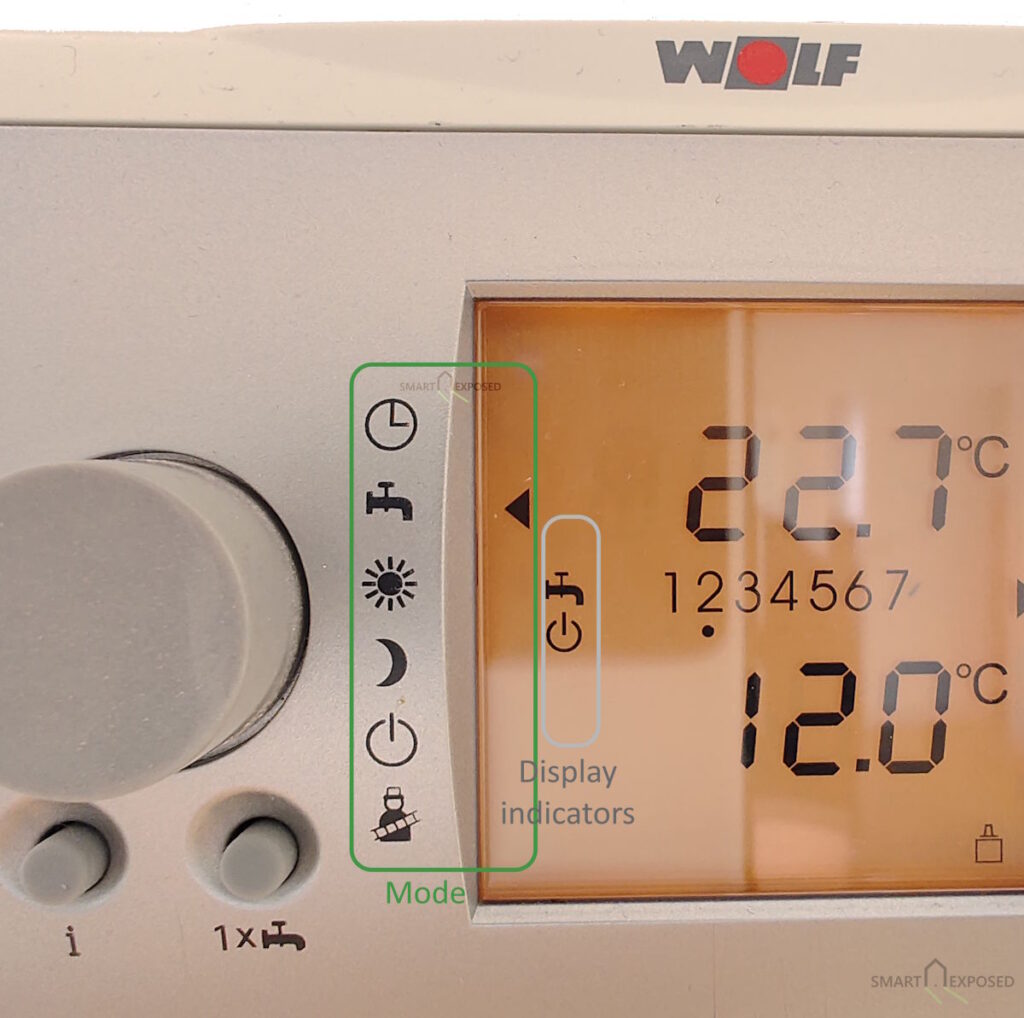
The operating mode – the most important value on the bus
The single most important field in the system is the mode byte from the BM thermostat’s broadcast (source 0xF1, destination 0xFE, PBSB 0x0800). This byte tells you what the system is currently doing:
| Value | Dial / Mode | Display indicators | Meaning |
|---|---|---|---|
| 0 | CLOCK | Auto | Auto / timer program, idle |
| 12 | CLOCK | TAP blinking | One-time DHW charge from CLOCK mode |
| 32 | STANDBY | Standby | Frost protection only |
| 44 | STANDBY | TAP blinking | One-time DHW charge from STANDBY mode |
| 64 | TAP | TAP | DHW / summer mode — burner heating DHW |
| 76 | TAP | TAP + Standby | DHW at setpoint, burner winding down or lurking |
| 160 | SUN | SUN | Day / heating mode — heating active, no DHW demand |
| 172 | SUN | SUN + TAP | Day / heating mode — heating active, DHW also recharging |
| 192 | MOON | Moon | Night setback |
| 204 | MOON | TAP blinking | One-time DHW charge from MOON mode |
The mode byte is a composite value: the upper bits encode the dial position, and the lower 0x0C bits encode the secondary display indicators currently lit. A value of 0x0C in the lower nibble always means the TAP/DHW indicator is active. Whether as a persistent state (DHW recharging while in SUN mode, DHW lurking while in TAP mode) or as a one-time DHW charge override triggered by a button press from CLOCK, STANDBY, or MOON. The three one-time DHW values (12, 44, 204) were confirmed by live testing — pressing the one-time charge button from each dial position and reading the resulting byte. The pattern held exactly as predicted by the composite model.
The critical insight: TAP mode (64) and MOON mode (192) are indistinguishable from the HcOperation.status field alone — both report 0x55 (DHW active, HC inactive). The BMMode broadcast is the only place on the entire bus where these two states differ. Without it, you cannot know whether the boiler is heating DHW because of a party mode activation or a night setback cycle.
During extended observation, one additional service menu value appeared: 96 (0x60), seen only while navigating the Wolf technician menu. A fallback entry in the Loxone Status Block handles it gracefully.
Burner modulation – a type correction story
The BoilerBcast message contains a field at byte position 3 that I initially decoded as type D1C, a signed byte divided by 2, naming it dhwsectemp under the assumption it was a secondary DHW temperature. The values it returned were suspicious: 34.5°C at maximum load, 13.0°C during steady operation, dropping to 0°C when the burner was off. A temperature that perfectly tracks load and goes to zero at shutdown is not a temperature.
The hypothesis: it is actually burner modulation as a percentage. Verification came from the Wolf service menu HG parameter table:
| HG Register | Configured value | Meaning |
|---|---|---|
| HG02 | 26 | Minimum burner output (%) |
| HG04 | 69 | Maximum output for heating (%) |
| HG03 | 100 | Maximum output for DHW (%) |
The raw eBUS byte values observed during operation were exactly 26 at minimum load and exactly 69 at the peak of a heating cycle, matching the configured limits to the integer. Changing the ebusd field type from D1C to UCH (unsigned byte, no scaling) immediately produced correct 0 to 100% modulation readings.
This is exactly the kind of finding that makes the manual approach worthwhile. No community definition would have caught this, it requires comparing live bus data against the boiler’s own service parameters.
The heat exchanger temperature quirk
The hxtemp field reads 60°C when the burner is running and 32°C when it is off, regardless of actual operating conditions. It is not a real temperature sensor reading. It is a binary burner-on indicator that happens to reuse the temperature data type. Presumably a legacy field maintained for protocol compatibility. It remains useful in Grafana as a simple burner activity marker.
The Polling Daemon
With ebusd running and decoding frames, a Python daemon handles the periodic polling and distribution.
The daemon opens a TCP connection to ebusd on port 8888, sends read -c <circuit> <message> commands for each of the five messages, parses the semicolon-delimited responses, and then:
- Writes to InfluxDB 2.x – measurement
heating, tagstation=kopaniny-home, all numeric fields - Sends one UDP packet to Loxone – newline-separated
KEY=valuepairs, one packet per cycle
The design is deliberately polling-based, not event-driven. The eBUS protocol does not send change notifications. Every participant broadcasts its full state on a fixed schedule. ebusd caches the most recently decoded value for each message. The daemon reads those cached values every 30 seconds, which is more than adequate for heating system monitoring.
Detecting a dead bus connection
One subtle failure mode: if the physical eBUS connection drops, ebusd continues serving its last cached values indefinitely. The daemon would keep pushing stale data to Loxone and Grafana with no indication that anything was wrong.
The solution: include the eBUS clock timestamp from the Kromschröder module (0x30) in every Loxone UDP packet. This device broadcasts a date and time message on the bus. The daemon reads it, parses the local time string (e.g. 15:03:10), and sends the hour and minute as a four-digit integer (BusTime=1503) to Loxone. Since this value comes from the live bus rather than the daemon’s own clock, it freezes if the bus connection dies — immediately visible on any status display.
UDP packet format
HeatingMode=160
BurnerState=7
FlowTemp=65.0
ReturnTemp=52.0
DhwTemp=54.0
Modulation=45
OutdoorTemp=9.0
HcSetpoint=58.0
BoilerOperation=187
BusTime=1503
Each key maps to a Virtual UDP Command in a Loxone Virtual UDP Input block, using the command recognition pattern KeyName=\v. No authentication is required for UDP input in Loxone, only the host IP and port need to be configured.
Loxone Integration
Status block: what is the boiler doing?
With HeatingMode, BurnerState, and BoilerOperation (zone controller command: 0=off, 85=DHW pump active, 170=HC circuit active, 187=DHW valve active + burner firing) as inputs, a Loxone Status Block can display a clear human-readable description of the boiler state:
| I1 (HeatingMode) | I2 (BurnerState) | I3 (BoilerOperation) | Display text |
|---|---|---|---|
| any | any | 0 | Standby |
| 32 | any | any | Frost protection |
| 64 | 0 | 85 | DHW mode | waiting |
| 64 | 7 | 187 | DHW heating |
| 76 | 7 | 85 | DHW satisfied | shutting down |
| 76 | 0 | 85 | DHW satisfied | lurking |
| 172 | 7 | 187 | Heating | DHW recharging |
| 192 | 0 | 85 | Night setback | waiting for DHW |
| 192 | 7 | 187 | Night setback | DHW heating |
| 160 | 5–6 | 170 | Heating | ignition |
| 160 | 7 | 170 | Heating |
| any | any | any | Unknown / service mode (fallback) |
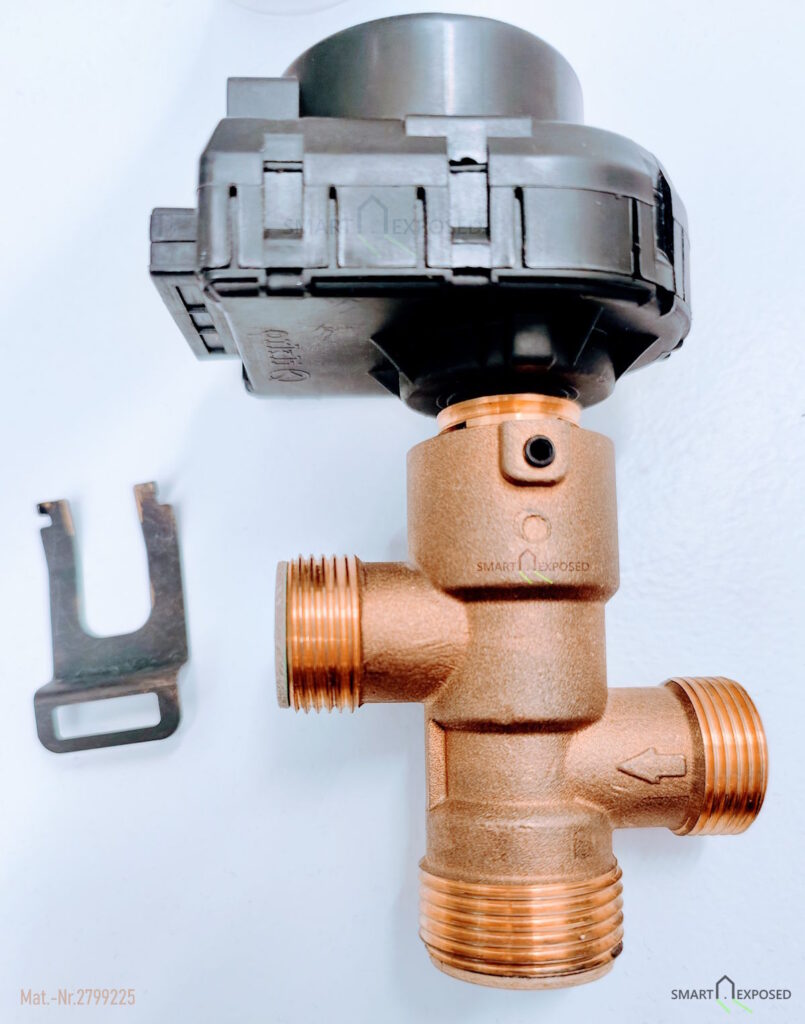
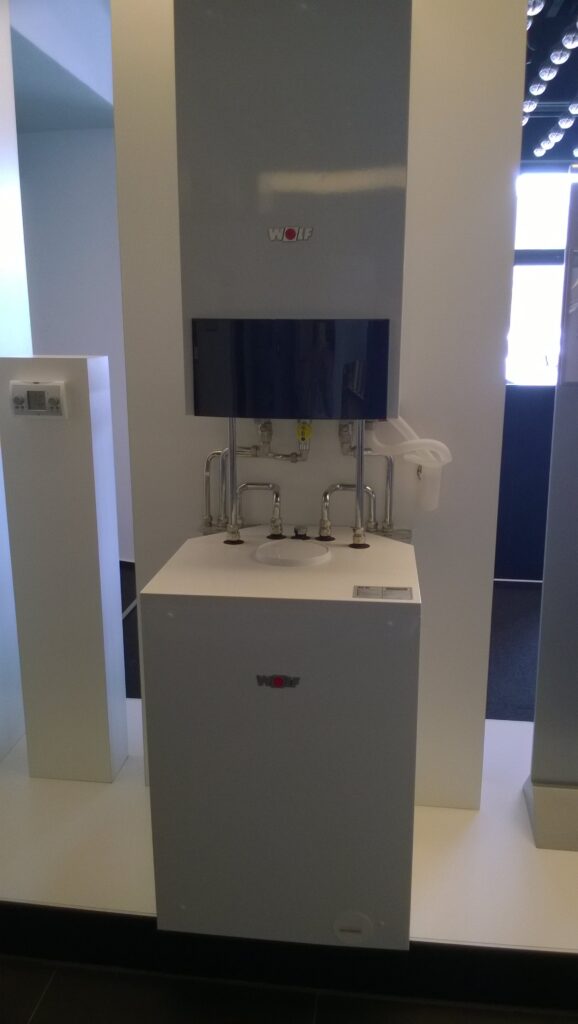
Hardware note: The CGW-11-100 has a two-position three-way valve, that routes flow either to the heating circuit or to the DHW heat exchanger. Never both simultaneously. (see picture from my repairs)
BoilerOperation = 187means the three-way valve has switched to the DHW position and the burner is firing for DHW, not that both circuits are active concurrently. The composite mode byte values 76 (TAP+STANDBY) and 172 (SUN+TAP) were established by correlating observed bytes with the physical display indicators described in the BM thermostat manual.
The Status Block evaluates rows top to bottom and uses the first match, so the broad catch-all rows (Standby, Frost protection) sit at the top.
Status block: temperatures
A second status block uses the four temperature values, adapting its display to whether the heating system is active. The HC setpoint drops to exactly 5°C whenever the system is not calling for heat, making it a clean binary condition:
- When
HcSetpoint > 5°C(heating demand active):Flow 65°C → target 58°C | Return 52°C DHW 54°C - When
HcSetpoint = 5°C(heating inactive — TAP or STANDBY):Boiler 41°C | Return 41°C DHW 54°C
The setpoint label and the “→ target” part disappear entirely when there is no heating demand, keeping the display uncluttered.
Grafana Dashboards
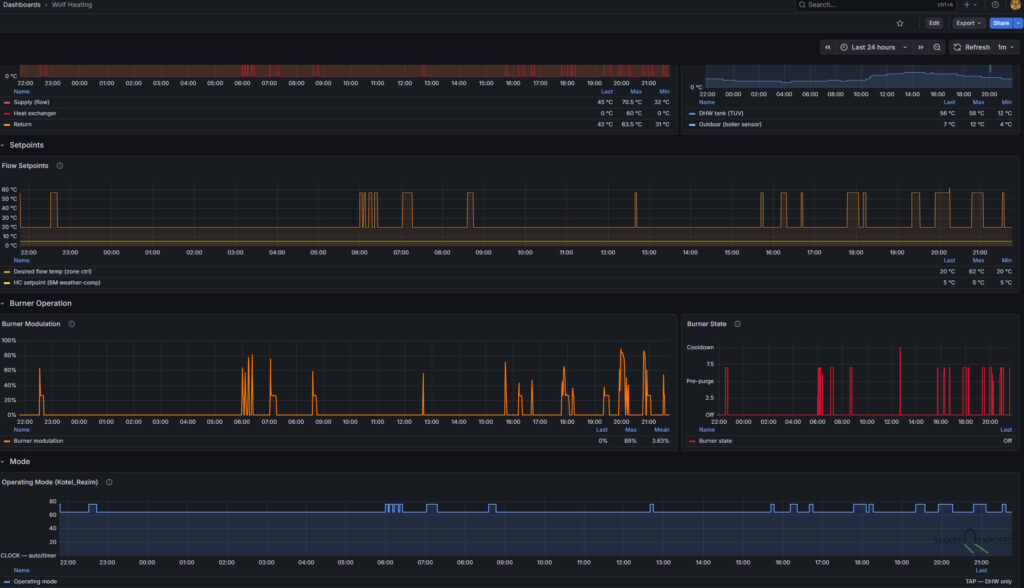
All values land in InfluxDB 2.x under measurement heating and are immediately queryable via Flux. A dashboard covering temperatures, setpoints, burner modulation, and operating mode gives a complete picture of every firing cycle. Iignition, ramp-up, steady state, and cooldown all visible as distinct phases on the timeline. DHW tank temperature is particularly worth tracking: it reveals heat loss over time, recovery duration after a draw, and confirms the 55°C setpoint is actually being reached.
What Is Not Possible
Controlling the boiler via eBUS command injection was investigated and ruled out. The BM thermostat re-broadcasts its full mode frame every 10 seconds continuously. Any injected frame from ebusd (at address 0x31) would be overridden within 10 seconds by the next BM broadcast. Actual control would require writing to the BM’s slave address (0xF6), the PBSB for that command is not documented and was not found through passive observation.
The system is therefore at the moment read-only by design, not by lack of effort. For the use case of monitoring and building automation awareness, this is entirely sufficient.
Conclusion
The Wolf CGW-11-100 turned out to be surprisingly transparent on eBUS. Five messages, eight useful values, all available passively with no modifications to the boiler, no proprietary gateway, and no cloud dependency.
The most significant insight from this project is not about any specific technical detail. It is that visibility into the heating system is itself valuable, independent of control. The Loxone status blocks now show the operating mode, burner state, and temperatures at a glance. The Grafana timelines show how the system behaved overnight, how modulation varied during a DHW reheat cycle, and how the weather compensation setpoint tracks outdoor temperature changes over a week.
What started as a workaround for a missing community configuration definition turned into a complete reverse-engineering of the bus protocol. And a far better result than polling a pre-built HTTP endpoint would have produced. The modulation discovery alone, made possible only by having access to raw bytes and the service menu simultaneously, would not have emerged any other way.
The hardware cost for the eBUS interface was under €30. The software stack (like ebusd, Python, InfluxDB, Grafana) is entirely open-source and runs on a Raspberry Pi already serving other purposes.
If you have a Wolf boiler with a BM thermostat, or a Vaillant / Saunier Duval system (which shares the eBUS protocol and a partially overlapping command set with older Wolf implementations AFAIK), the approach described here should translate with adjustments to the CSV field definitions.
Using These Definitions
The ebusd message definitions for the Wolf CGW-11-100 are available for download: wolf_raw.csv
If you have the same boiler with a BM thermostat, this file should work on your bus without modification.
Installation
- Copy the file to the ebusd configuration directory:
sudo cp wolf_raw.csv /etc/ebusd/ebusd-configuration/archived/en/- Start ebusd with these options:
--device=enh:<your-adapter-ip>:9999
--configpath=/etc/ebusd/ebusd-configuration/archived/en
--scanconfig
--loglevel=notice
Important — use archived/en, not src/. The Wolf CGW-11-100 uses Kromschröder electronics internally, so the bus includes a Kromschröder module (master 0x30, SW=0204) as a standard hardware component. This is not specific to any individual installation, it is how all first-generation Wolf CGW boilers are built. When ebusd scans the bus with --scanconfig and src/ as the configpath, it downloads Kromschröder-specific definitions for that module which conflict with and silently drop the Wolf message decoding. Using archived/en avoids the automatic download of conflicting scan configs while keeping the Wolf definitions fully functional.
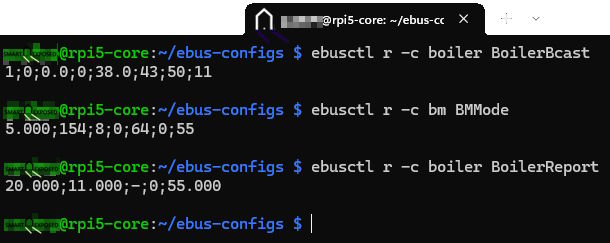
- Verify decoding is working:
ebusctl r -c boiler BoilerBcast
ebusctl r -c boiler BoilerReport
ebusctl r -c bm BMMode
ebusctl r -c bm BMBcast
ebusctl r -c controller HcOperation
Each command should return semicolon-delimited values within a few seconds. If you see ERR: element not found, ebusd has not yet received the message. Wait for the next broadcast cycle (up to 10 seconds for BMMode, a few seconds for BoilerBcast).
Contributing upstream
These definitions do not currently exist in the ebusd-configuration repository. I will try to validate few things but if you have a Wolf CGW-11-100 and can verify the definitions work on your installation, that would be awesome. Once settled, I plan submitting a pull request to john30’s repository would make them available to anyone using ebusd with auto-configuration, including the standalone ebusd WiFi and ESP adapters that run without a separate computer. The archived/en path requirement and the Kromschröder conflict explanation would need to be called out in the PR description to not confuse people too much.
Resources
- ebusd project (john30) – the eBUS daemon and hardware dongle
- ebusd configuration repository – community message definitions for many boiler brands
- Wolf HG service parameters – accessible via the boiler’s own service menu ()
- InfluxDB 2.x, Grafana, Loxone Miniserver – standard self-hosted stack, many of you are using this already
What could we do better?